
Equalizer APO Config GUI

[alert style=”dark” close=”false”]This piece of software will not be updated anymore, as it has outlived it’s usefulness. However, you’re free to use it in it’s current state.
If you would like a GUI that is actually developed, give Peace GUI a try.
Alternatively, user jiiteepee of diyaudio forums has also developed a few GUIs much more complex than the one you can find on this page.[/alert]
Just having upgraded recently to Windows 8, I found that my on-board sound-card has lost its driver’s Equalizer function, and being the owner of some shitty speakers, I really wanted to change how they sounded.
So by Googling around, I found this amazing piece of software: Equalizer APO.
Equalizer APO is, like it’s name says, an APO, a system which was introduced in Windows Vista. Windows already comes with a few APOs by default, and you surely must be familiar with them:
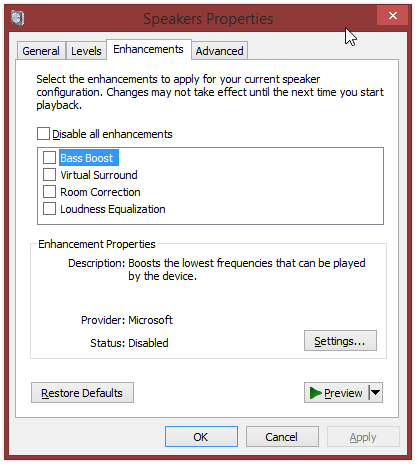
While Equalizer APO is a really awesome piece of software, really does everything I want (and more!), it lacks a configuration GUI. There is no simple UI to have you move some sliders and listen to how your sound adjusts. Equalizer APO recommends using Room EQ, but I found that way too complicated for my needs, so instead, I made my own GUI!
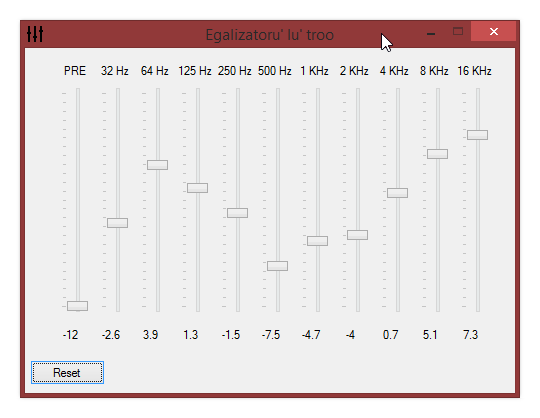
It has some pretty basic functions – it only writes to a config file (eq.txt in it’s directory), and reads those values back upon re-opening it again.
How to use
By itself it does absolutely nothing! You have to install Equalizer APO first!
After you install Equalizer APO for your soundcard, there’s 2 things you have to do:
- Edit the default config file ( \Program Files\EqualizerAPO\config\config.txt ) to read something like this:
Preamp: 0 dB
Include: eq.txt
The “eq.txt” file name is hard-coded at the moment, so it will only work with that!
- Drop the GUI’s .exe in the config directory (again, \Program Files\EqualizerAPO\config\)
- Start the GUI and play around with the settings. You should notice a change in the sound as soon as you move the sliders.
Download
The file comes in 2 versions, though the 32bit version should work on both 32bit and 64bit without any issues:
Source is available upon request. It’s written in AutoIT.
ChangeLog
0.1.0.0 - Initial Release



Thank you for this. I’ve started using it today and I find it very helpful.
Actually just what Equalizer APO needs. I was wondering why it didn’t had nother like this and just talked about REW which I don’t want to download since it looks complicated and is old. Now it does have a nice app to work with thanks to you man! Made my music sound great!
fantastic man, get some feedback changing settings sometimes, but other than that, this is perfect. Love that it hard codes the settings and i do not have to leave it open. Great job!.
Yeah, I noticed that, too, sometimes.
I know what is causing it (rewriting the file when a slider’s value changes very fast), but I haven’t figured an elegant way to fix it.
Maybe you could write to the file when you let go of the slider, or just write to the file every 0.5 sec. Anyway, the sound doesn’t bug me at all. Thanks for this great little program!
That was how I made it initially. Believe it or not it’s actually more work to have it update instantly on movement, than on mouse release. But then you would lose the real-time update, and it gets frustrating. I will probably try adding some sort of delay, which seems to be the better option. I have some other modifications in mind which I will hopefully get around implementing.
Glad you enjoy it!
I was actually very close to stating writing one myself, but since I rarely use windows I didn’t get around to it and just edited the file manually till I found this :). I would gladly help you improve the application if you want some help and decides to open source it.
I’m very much interested in the source code. This is awesome. I was thinking about creating an equalizer mysefl but then I found this. If you could send me your source code that would be great.
Thanks
Sure, please leave an e-mail address and I’ll send you the required info.
thank you so much.
Amazing – thank you very much!
Your GUI interface is a terrific front end for Equalizer APO. Walks all over REW. Thank you for taking the time to work this out. You’re the king!
Thank you.
Thank you sooooo much. I’m using rMBP with bootcamp Win 7 ×64 sp2. I’ve been looking for music equalizer, but no luck until i found this program. It works just like a charm. Thank you for sharing, Znuff. I LOVE YOU.
Hey, thanks for this. The APO was already great, but your interface makes it really useable.
I just wish your GUI includes the “parametric” stuff from the EQ (Peak, lo-cut, Q factor…)
But hey, it’s great already 🙂
I tried to figure out about a way to include at least the Q factor in the GUI, but I’m not that good at UX and I don’t have a solid idea of how to present it to users in a friendly form.
This is amazing!! Thank you so much 🙂
thank god for this program
Can’t get it to work on Windows 7 home 64 bit sp1, asus maximus VI hero onboard realtek ALC1150, though the whole EqualizerAPO doesnt work at all no matter what i do so of course your gui wouldnt work, any idea?
had “disable all enhancements” box ticked, untick>restart>problem solved lol
A cool idea would be to add a list to save preset profiles or something, if you can do that, that would be awesome, so you can change between presets on the fly, save you redoing it everytime you plug in some headphones switching from speakers, or if u plug the headphones in the speakers. . . . .
I’ll keep that in mind next time I get to work on it 🙂
Help!
Maybe I’m missing something obvious, but anyone else getting this error?
I tried with pre-amp @0 and same problem.
http://i.imgur.com/MGh8SsE.png
image didn’t seem to upload. sorry.
Did you manually change eq.txt?
Yes. Seems I thought too much into it.
The exe creates the eq file. Got it.
Any chances of implementing finer controls in the 40-100hz range?
64-80-90-125?
Thanks for your help.
I actually had an idea for that to be configurable, just never got around to finalize an implementation. Also I kind of neglected this project lately 🙂
This is great, thanks so much for making this public. just what I needed to make EqAPO really functional.
cooi…..great…….
Thanks a bunch! I can’t use Realtek equalizer since my laptop uses amd chipset, and this works great!
Very nice. Good work because I didn’t really understand how to create an EQ by myself. You should put the source up on GitHub I’d love to take a look at it.
It’s incredibly simple – here’s a gist: https://gist.github.com/Znuff/ba238df2a3651ca2e769
(AutoIT .exes can can also be decompiled)
This is great! The suggested software is just too darn complicated. This helps a lot!
great!
very nice tool 🙂
Plain and SIMPLE!!!! YOU ARE THE MAN!!! But is there any way to jack the preamp up? or is that about all u get
You could edit the config.txt file and set Preamp to a higher value (5, 10 etc). But keep in mind that you will most likely run into sound-clipping issues.
Does the loudness equalization decrease with volume (is it the Fletcher-Munson curve)?
Thanks!
I’m in no way qualified to answer that.
amazing, exactly what i was looking for as i wanted to set up equalizer APO but was way too confusing. 10/10 IGN
Awesome tool, man. Really like the simplicity… REW is way to complex.
This is really nice little gui. There’s so little on the web in regard to system-wide EQ. Thank you for sharing!
perfect! it works! awesome!
after installing the apo i lost all sound on the chosen speakers i wanted it to work on. any ideas?
Mate you are AWESOME! THX!
That was JUST what I needed, Thank you!
Brilliant Work! Just what I needed. Thanks a LOT!
am a newbie in this. so, can i save my gui settings???how???thanks!
[…] If you want more information, you can check out his website at: https://linge-ma.ro/equalizer-apo-config-gui/ […]
Many thanks – I turn the pre-amp slider all the way up and now I can hear my speakers at a decent volume – much appreciated!
Hi. Do you have updated links? The dropbox links no longer seems to work.
I have downloaded many programs to increase sound volume only to be disappointed and then uninstalling them but the APO equalizer is the best program to increase sound volume it works like a charm for me. It was tricky learning how to activate it but once i did…..WOW…..what a difference.
can you tell me how you activated it?
thank you.
I’ve done but the audio isn’t changing. I edited the config file and downloaded the simple GUI 64 bit. I have windows 8. I don’t understand the next step : Drop the GUI’s .exe in the config directory (again, Program FilesEqualizerAPOconfig). How do I do this? Thanks